Pendaftaran Jalur Reguler 2 Gelombang 1 TA 2026-2027 T.A. 2026 - 2027 Daftar Sekarang

Pendaftaran Profesi Semester Gasal Gelombang 1 TA 2026-2027 T.A. 2026 - 2027 Daftar Sekarang

Pendaftaran Program Khusus Reguler 2 Gelombang 1 TA 2026-2027 T.A. 2026 - 2027 Daftar Sekarang

Pendaftaran Program Alih Jenjang Gelombang 3 TA 2026-2027 T.A. 2026 - 2027 Daftar Sekarang

Pendaftaran Program RPL Gelombang 3 TA 2026-2027 T.A. 2026 - 2027 Daftar Sekarang

Pendaftaran Magister Semester Gasal Gelombang 1 TA 2026-2027 T.A. 2026 - 2027 Daftar Sekarang

Perguruan Tinggi Terbaik No 2 Institut Swasta 2020

Pendaftaran

Info Pendaftaran

Tata Cara Daftar Formulir Pendaftaran Online Tata Cara Pembayaran Online Jadwal Pendaftaran Prodi Tepat Untukmu Info Biaya Pendidikan Info Beasiswa Program Kelas Karyawan

Info Kost, Transportasi & Biaya Hidup

Asrama Mahasiswa KOSy Kost Mahasiswa Transportasi Prediksi Biaya Hidup

Fakultas

Fakultas Farmasi

Pendidikan Profesi Apoteker S1 Farmasi D3 Farmasi D3 Analisis Farmasi dan Makanan

Fakultas Kesehatan

Pendidikan Profesi NERS Pendidikan Profesi Bidan S1 Keperawatan S1 Kebidanan S1 Gizi S1 Fisioterapi S1 Psikologi D4 Pengobatan Tradisional Tiongkok D3 Fisioterapi D3 Kebidanan

Fakultas Kedokteran

Pendidikan Profesi Dokter S1 Kedokteran

Fakultas Kedokteran Gigi

Pendidikan Profesi Dokter Gigi S1 Pendidikan Dokter Gigi D3 Teknik Gigi

Fakultas Teknologi dan Manajemen Kesehatan

S2 Kesehatan Masyarakat S1 Kesehatan Masyarakat S1 Administrasi Rumah Sakit D4 Teknologi Laboratorium Medis D3 Teknologi Laboratorium Medis D3 Rekam Medis & Informasi Kesehatan

Tentang IIK Bhakta

Profil IIK Bhakta

Sejarah & Perkembangan IIK Bhakta Sambutan Rektor Visi Misi Reputasi Rektor IIK Bhakta masa ke masa Prestasi Jajaran Pimpinan IIK Bhakta Dewan Penyantun IIK Bhakta Maskot Bhakta Filosofi Pendidikan

News & Events

Upcoming Event Latest News Announcement

Adipadma Library

Adipadma Library Repository Adipadma Library Online Catalog

Fasilitas & Peta Kampus

Fasilitas Kampus Peta Kampus IIK Bhakta Virtual Tour

Services Unit

Rumah Sakit Gigi & Mulut IIK Bhakta Pelayanan Kemahasiswaan & Alumni Pusat Bahasa PLTI (Pusat Layanan Tes Indonesia)

Other

Blog Lumina Kalender Akademik Bhakta Peduli Bhakta Shop Pusat Karir Bhakta

Kehidupan Kampus

Organisasi Mahasiswa DPM BEM HIMA UKM
MBKM

Search

Apa yang sedang kamu cari ?

Tata Cara Pembayaran Online Iik Bhaktiwiyata | IIK Bhakta

Registration for Year 2026 - 2027 Regist Now

The Employee Class Program (RPL, Program and Level Transfer Categories) for TA 2024-2025 has been opened. More Info

Banner Online Registration IIK BW


Online Registration payment procedure

 
As a quality campus, IIK Bhakti Wiyata offers facilities for prospective new students to register online. In addition, you can also easily pay for online registration fees through IIK Bhakti Wiyata partner banks. The method of payment is as follows:
 

OCBC NISP Bank Virtual Account

A. How to pay via ATM

OCBC NISP BANK

1. Choose another Menu

payment via ocbc atm machine step 1

2. Choose Payment

payment via ocbc atm machine step 2

3. Choose Next Menu

payment via ocbc atm machine step 3

4. Choose Virtual Account menu

payment via ocbc atm machine step 4

5. Insert 16 digits of Virtual acount number (it is different for each registrar)

payment via ocbc atm machine step 5

6. The screen will show Bhakti Wiyata Institution, your virtual account numbers, then insert the amount of online registration fee, and press "TRUE" to carry out payment.

payment via ocbc atm machine step 6

ATM of the other Banks

1. Choose "inter Banks transfer" menu

2. Insert the Bank Code of OCBC NISP (028)

3. Insert 16 digits of virtual account number on the target account

4. Insert the nominal to be paid.

5. Then follow the instruction on the ATM machine.

B. Payment System via Internet Banking

OCBC NISP BANK

1. Login by User ID and Pasword

2. Choose the demand for payment menu

3. Choose One time payment menu

4. Choose Virtual account, click Next

5. Choose the source menu, insert your virtual account number, and insert the payment date as needed.

6. Click "Show", check the appearing information. Make sure about the institution: Bhakti Wiyata and the virtual account number is suitable with the given one when carrying out the online registration process.

7. When it is OK, insert the amount which is going to be paid.

8. Please insert the given token code given "OCBC NISP Token"

9. After finishing, the validation evidence will appear from the system, and then print or save used as a proof.

The Other Banks

1. Login by User ID and Pasword

2. Choose "inter Banks transfer" menu

3. Choose OCBC NISP Bank (code 028) as the receiver bank

4. Insert 16 digits of virtual account number on the target account

5. Insert the nominal to be paid.

6. Check the appearing information. Make sure about the institution: Bhakti Wiyata and the virtual account number is suitable with the given one when carrying out the online registration process.

7. When it is OK, pleasec continue the payment process

8. After finishing, the validation evidence will appear from the system, and then print or save used as a proof.

C. The Paymemt System via Teller

OCBC NISP BANK

1. Direcly come to the teller of OCBC NISP Bank at any branches.

2. Fill out the payment blank and fill out the Virtual Account number on the target account and the paid nominal and and the registrar’s name and news on the explanation column.

3. Hand the blank over to teller to proceed the payment.

The Other Banks

1. Direcly come to the bank teller.

2. Fill out the payment blank and fill out the Virtual Account number on the target account and the paid nominal and and the registrar’s name and news on the explanation column.

3. Hand the blank over to teller to proceed the payment.

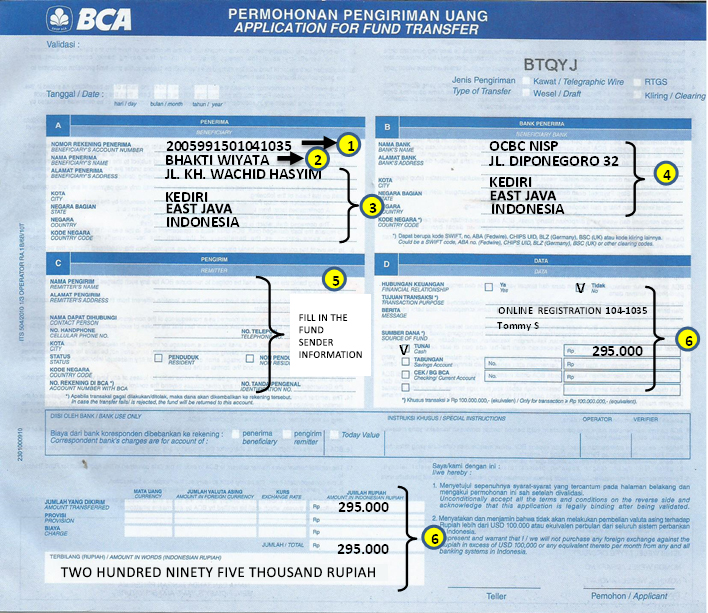
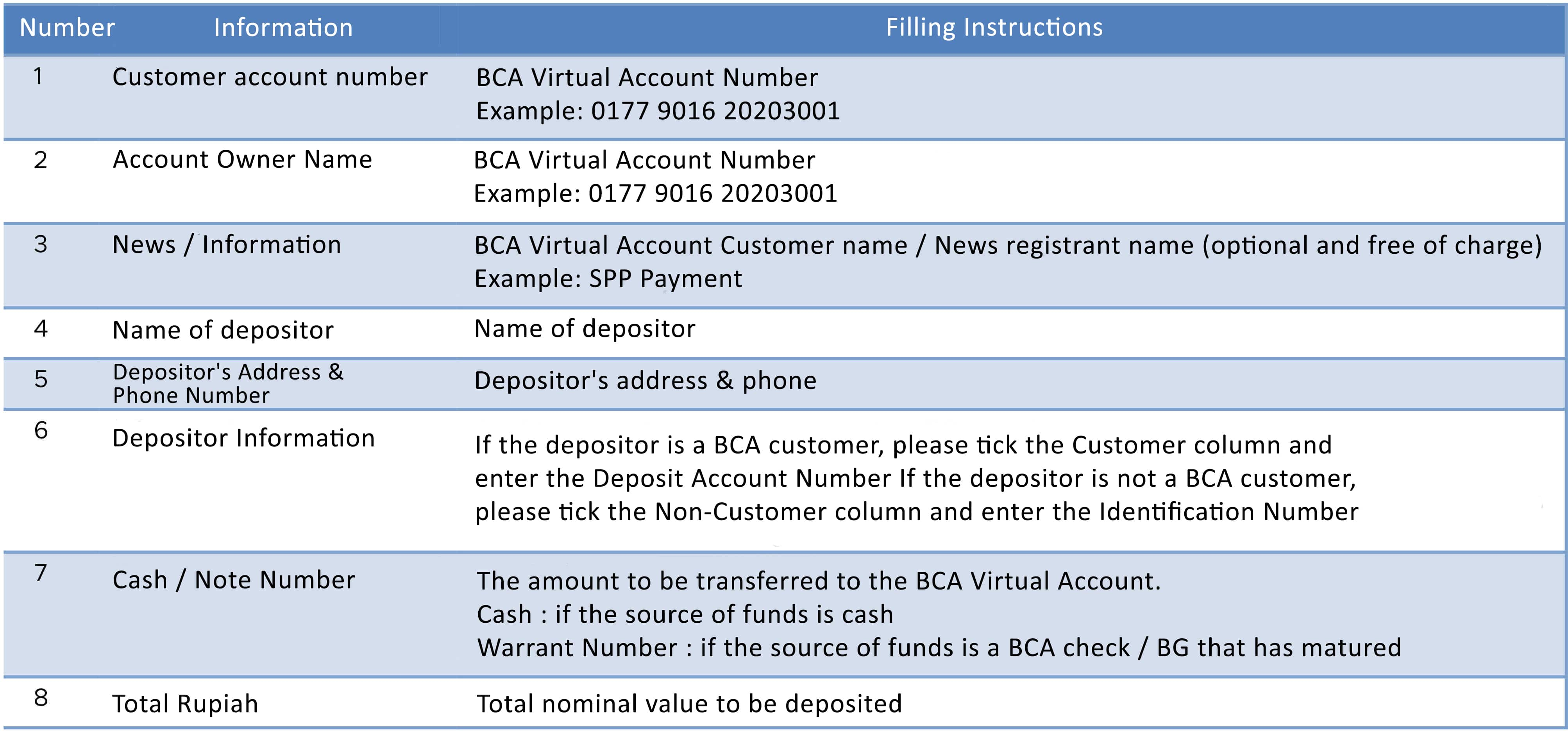
An Example of how to fill out the cash payment blank of BCA Bank

contoh blanko setoran tunai bank bca

1. The Virtual Account Number of OCBC NISP

2. Institution name, insert: "Bhakti Wiyata"

3. The Institution address, insert: "JL. KH. WACHID HASYIM"

4. Insert the information from the receiver bank (OCBC NISP).

5. Insert the name of money sender.

6. Insert news and the transfer nominal.

Note

  • Make sure that you have nserted the correct virtual account number.
  • Make sure that you have inserted t the payment information correctly and completely.
  • Keep the ATM payment proof or payment slip as aproof of payment.

BCA Bank Virtual Account

A. How to pay via ATM

BCA BANK

1. Choose the Other transactions

payment via bca atm machine step 1

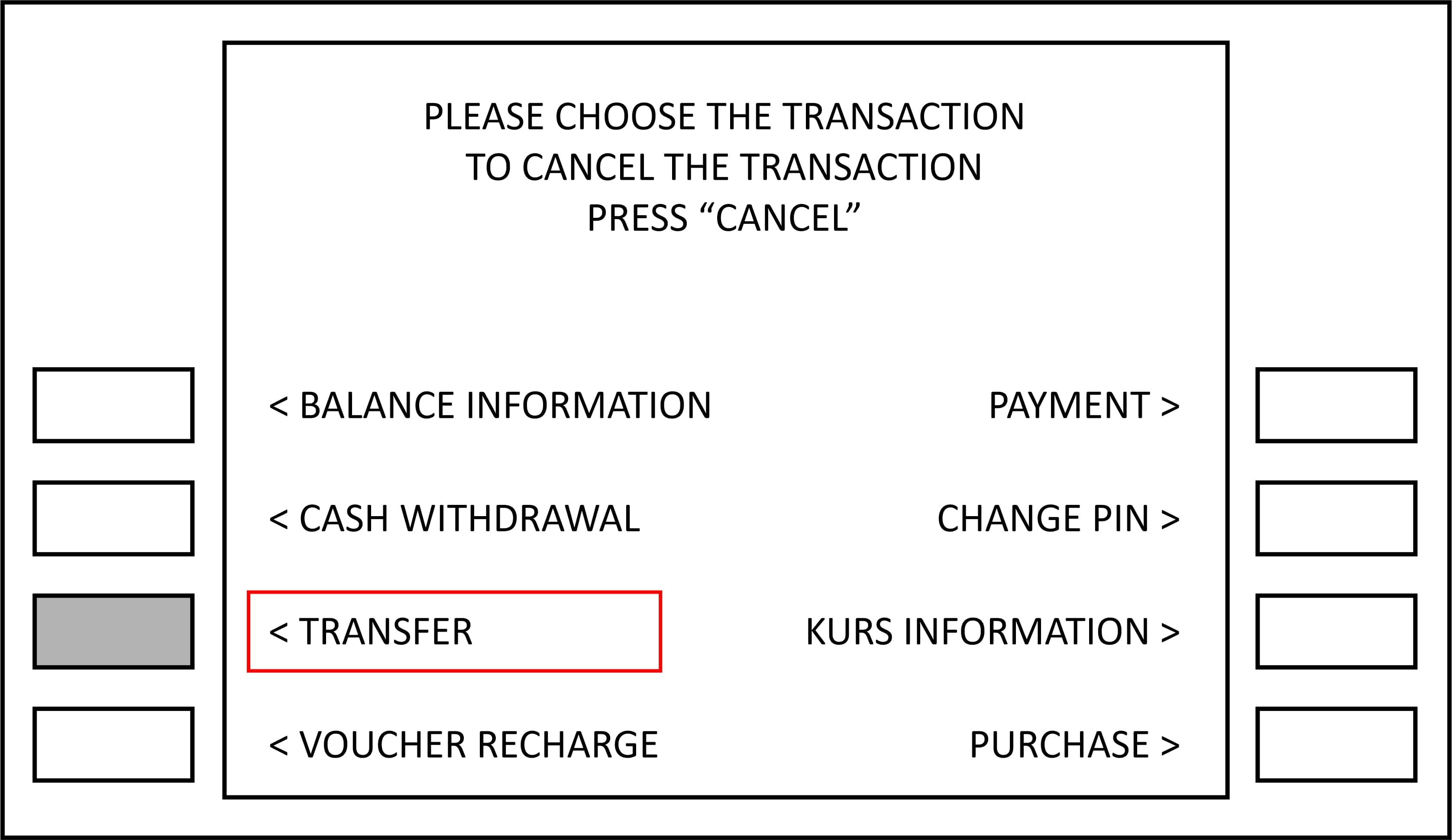
2. Choose Transfer

payment via bca atm machine step 2

3. Choose BCA Virtual account MENU

payment via bca atm machine step 3

4. Enter the 16 digit Virtual Account number (differs per registrant) and choose right

payment via bca atm machine step 4

5. Enter the nominal you wish to transfer (transfer according to study fees paid)

payment via bca atm machine step 5

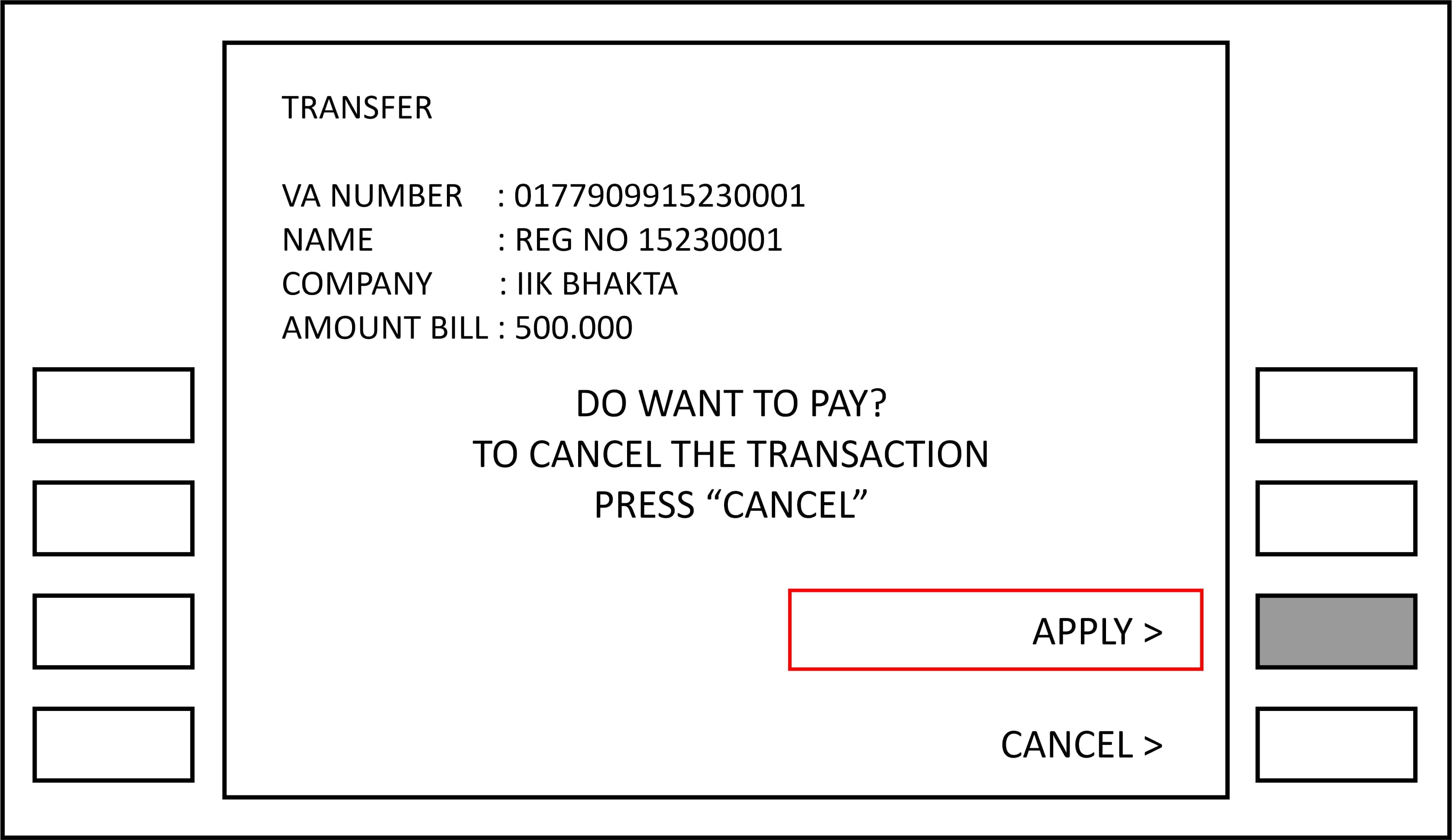
6. The screen will display your Virtual Account number and name, company / product IIK Bhakti Wiyata, and nominal study costs will be paid, and press "Yes" to make payment.

payment via bca atm machine step 6

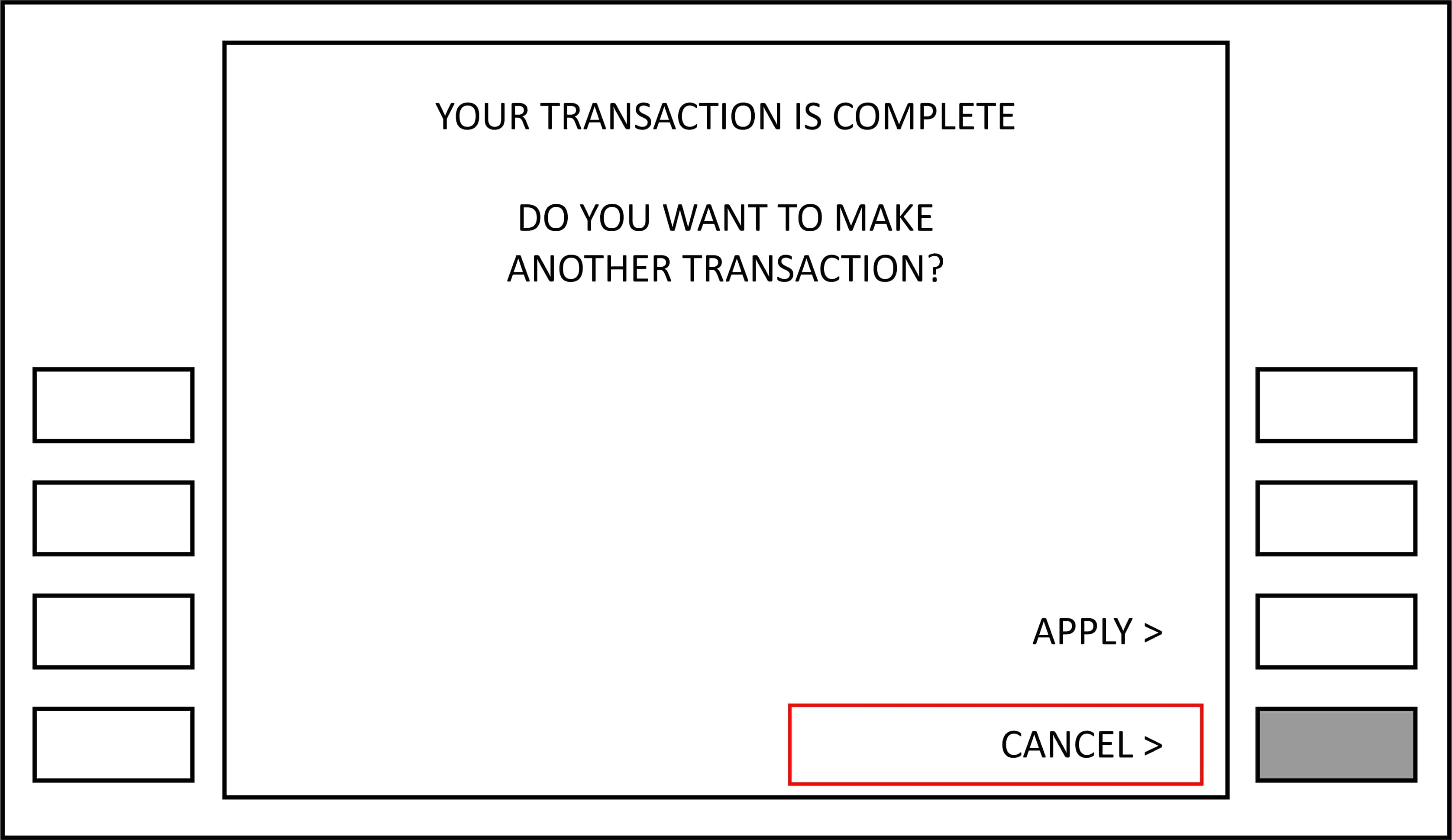
7. After a successful transaction, select NO to end transaction. Transaction complete.

payment via bca atm machine step 7

B. Payment Method Through Internet Banking

BANK BCA

1. Login with your internet banking User ID and PIN

2. Select the Fund Transfer menu

3. Select the Transfer menu to the BCA Virtual Account

4. Fill in No. Your BCA Virtual Account, click continue

5. Enter the Transfer Amount and the news (optional), then click Continue (note: ignore billing information and total bill Rp 10,000, enter the transfer amount as required paid for)

6. Check the transfer information, make sure No. Virtual Account entered correctly. If it is appropriate, enter no. key response BCA appli 1 then click send

7. Transaction has been completed. Keep proof of this transfer for marks valid proof of payment if needed at any time

*Payment using ATM or Internet Banking to BCA Virtual Account can only be done for fellow BCA account users.

C. Payment Methods Through Teller

BANK BCA

1. Come directly to any branch of Bank BCA teller

2. Fill in the deposit blank and fill in the required information as in below this

contoh blanko setoran tunai bank bca

Note

  • Make sure you enter the correct virtual account number
  • Make sure you fill in payment information correctly and completely
  • Keep ATM receipt or payment slips as proof payment


icon e-brosur

Kirim e-Brosur

Ingin tahu detail info tiap prodi di IIK Bhakta dan info beasiswa? kami akan mengirimkan brosur lengkap untuk Anda!